
The Search Screen That Looks Fine and Ships Broken
You open the starter code and it works. Type, results appear, rows render. Then the interviewer asks how this becomes production-ready, and a prepared candidate starts losing points they never see. This is a mid-level Mobile Developer interview on iOS fundamentals: Swift, UIKit, ARC, and threading, all hiding inside one innocent search screen.
Below is a dramatized walkthrough (illustrative, not a real transcript) built on one real blueprint from the InterviewStack.io AI mock interview. Browse current Mobile Developer openings and you will see why these fundamentals keep getting tested.
Key Findings
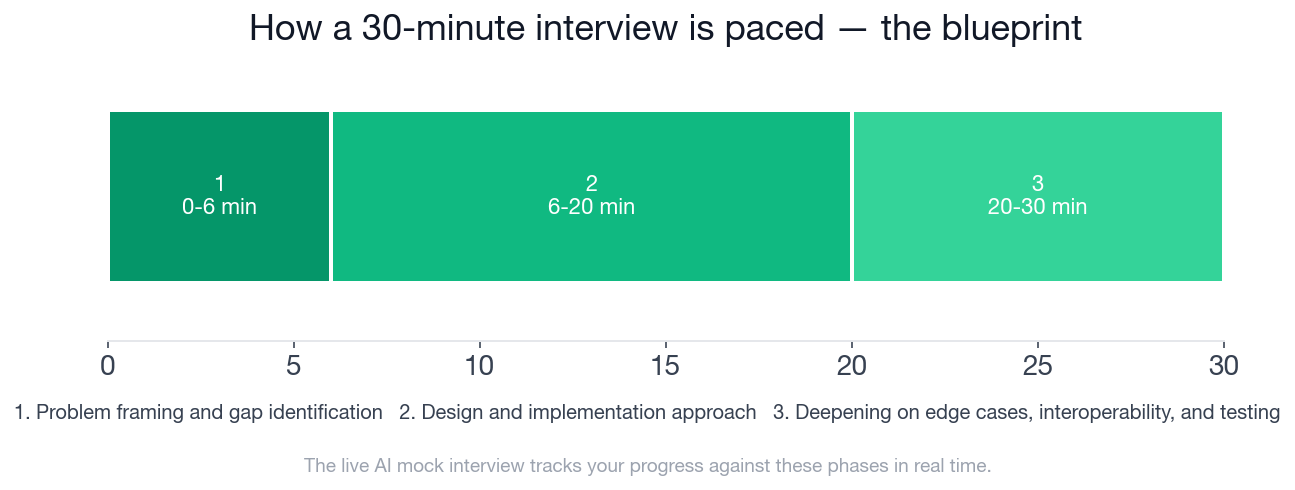
- The mock interview is 30 minutes split into 3 phases: 6 minutes of framing, 14 minutes of design, 10 minutes of edge cases.
- Scoring is out of 100: 30 for interviewer objectives, 30 for level-specific expectations, 20 for technical proficiency, 20 for communication.
- 16 checklist items are tracked across the three phases (5, 6, and 5).
- The starter code has at least 5 production gaps: keystroke flooding, out-of-order responses, thread safety, closure lifetime, and cell reuse.
- Only 20 of 100 points are for raw technical proficiency; 60 reward objectives and level-appropriate judgment.
- A strong answer names a fix for stale responses within the first 20 minutes, before the design phase ends.
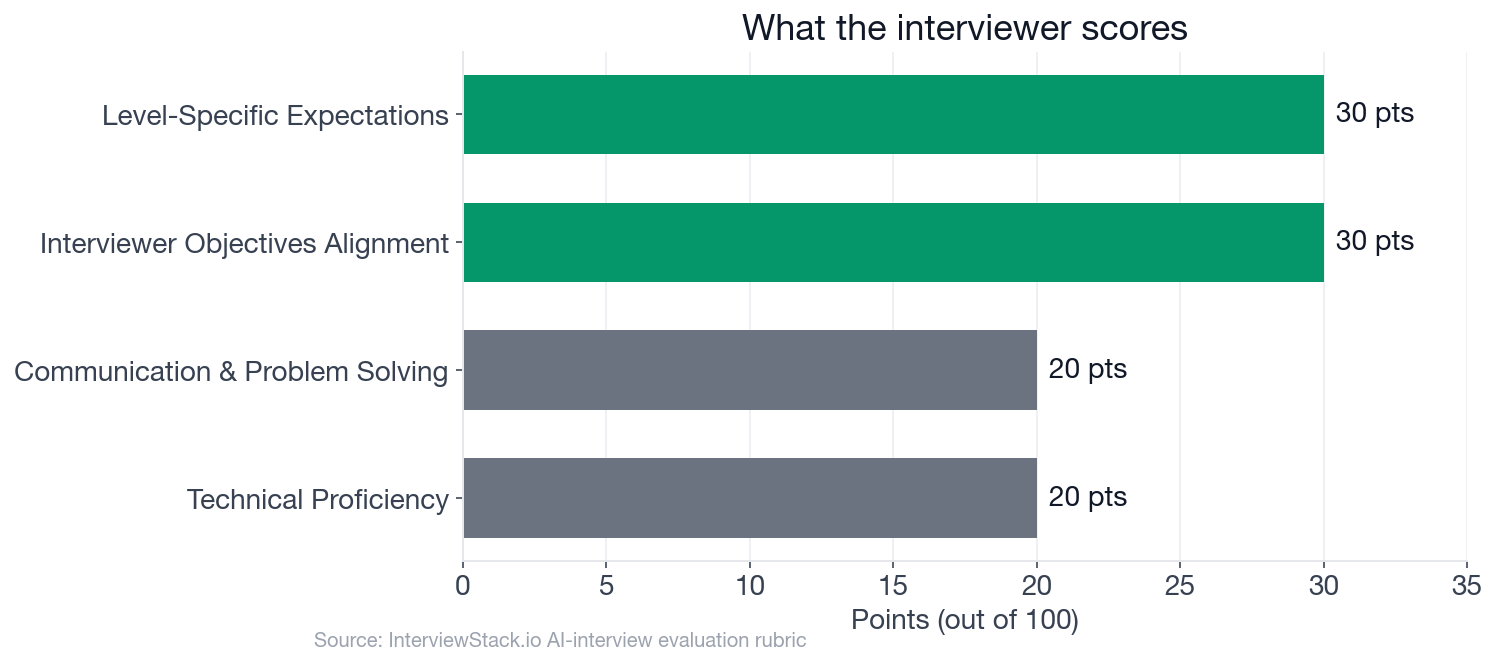
The weights show where interviews are won: judgment and level-appropriate tradeoffs carry more than syntax.
What Is This Mobile Developer iOS Interview Really Probing?
Here is the question, exactly as a candidate would see it.
The interview question
You inherit this search screen. A view controller owns a search bar, a table view, and a service protocol with a callback-based search method.
import UIKitstruct SearchResult: Decodable, Equatable { let id: String let title: String let subtitle: String }
protocol SearchService { func search(query: String, completion: @escaping (Result<[SearchResult], Error>) -> Void) }
final class SearchViewController: UIViewController, UISearchBarDelegate, UITableViewDataSource { let searchBar = UISearchBar() let tableView = UITableView()
var service: SearchService! var results: [SearchResult] = [] override func viewDidLoad() { super.viewDidLoad() searchBar.delegate = self tableView.dataSource = self } func tableView(_ tableView: UITableView, numberOfRowsInSection section: Int) -> Int { results.count } func tableView(_ tableView: UITableView, cellForRowAt indexPath: IndexPath) -> UITableViewCell { let cell = UITableViewCell(style: .subtitle, reuseIdentifier: "cell") let item = results[indexPath.row] cell.textLabel?.text = item.title cell.detailTextLabel?.text = item.subtitle return cell } func searchBar(_ searchBar: UISearchBar, textDidChange searchText: String) { service.search(query: searchText) { result in switch result { case .success(let items): self.results = items self.tableView.reloadData() case .failure: self.results = [] self.tableView.reloadData() } } }}
Using the code above as a starting point, how would you evolve this into a production-ready search experience for an iOS app?
The interviewer is checking four things: can you spot the real defects unprompted, pick a pragmatic design, reason about concurrency and ARC correctly, and keep the UI right under cancellation and reuse. It is a feature-owner question, not a framework-architect one.
The Walkthrough: Four Turns, Four Leaks
Marcus is our illustrative candidate. Each turn shows a common slip, what it costs, and the move that recovers it.
Turn 1: Stale Responses Win
Interviewer: "How would you prevent stale network responses from older queries from overwriting newer results?"
Turn 2: The Retain Cycle Claim
Interviewer: "What memory-management issues do you see in this code, and how would you address retain-cycle or lifetime concerns?"
Turn 3: Who Owns the Main Thread
Interviewer: "What threading guarantees would you want from this implementation, and where would you enforce UI updates on the main thread?"
Turn 4: Testing Without a Network
Interviewer: "How would you test this view controller or the extracted search logic without relying on real network calls?"
Why Isn't Reading This Enough?
Spotting these mistakes on the page is easy, because you know the answer is coming. Live, you get one unscripted follow-up at a time, a clock, and a silence that wants filling. Knowing that a debounce does not order responses is different from saying it clearly in minute nine while also deciding where the token check lives. That fluency comes from reps, and a mock interview is the cheapest place to take them.
What Does the Complete Blueprint Look Like?
This is the blueprint a strong candidate hits, and the exact structure the AI mock interview tracks you against in real time.
- ✓Calls out that searches fire on every keystroke with no debounce/throttle
- ✓Mentions stale/out-of-order response risk
- ✓Mentions UI updates must occur on the main thread
- ✓Notes closure capture of self and potential lifetime issues
- ✓Recognizes table-view cell reuse/setup is simplistic and not ideal for production
- ✓Proposes or sketches a debouncing mechanism for text input
- ✓Introduces cancellation, query tokens, or sequence IDs to ignore stale responses
- ✓Ensures result application and reloadData happen on the main thread
- ✓Uses dependency injection for SearchService and separates orchestration from raw view code
- ✓Handles empty query behavior explicitly
- ✓Uses [weak self] or another safe lifetime pattern in async callbacks
- ✓Describes how to test async search behavior with a mocked service
- ✓Explains at least one approach to Objective-C interop constraints relevant to the API surface
- ✓Discusses loading, error, and no-results states in a concrete way
- ✓Addresses rapid typing, backend rate limiting, or cancellation cleanup
- ✓Explains why the chosen design is sufficient for a mid-sized feature rather than overengineered
Run It Live
Do this interview out loud. Start the AI mock interview on this exact question and get scored against the 16 checklist items above. To drill the underlying topics first, open the iOS Development question bank or browse interview preparation guides for your target company.
FAQ
Q. What does a mid-level Mobile Developer iOS interview test?
It tests whether you can inspect working Swift and UIKit code and find production gaps without heavy hints: request flooding, stale responses, main-thread safety, closure lifetime, and testability. The rubric spreads 100 points across four dimensions: 30 for interviewer objectives, 30 for level-specific expectations, 20 for technical proficiency, and 20 for communication.
Q. How do you stop stale search responses from overwriting newer results?
Debouncing reduces request volume but does not order responses. Cancel the in-flight request when a new query starts, or tag each request with an incrementing token and ignore any completion whose token no longer matches. At mid-level, simple tokening or task cancellation beats an abstract framework.
Q. Is a strong closure capture of self always a retain cycle in Swift?
No. A strong capture only forms a cycle if the captured object also retains the closure, for example a service that stores its completion handler. Even without a cycle, a strong capture keeps a dismissed screen alive until the request returns, so use a weak self capture and cancel work when the screen goes away.
Q. Where should UI updates happen when a Swift completion handler might run on a background queue?
On the main thread, enforced at the boundary where results are applied. A protocol that does not promise its callback queue should not be trusted to call back on main, so hop to the main queue (or use a main-actor method) before touching results or calling reloadData.
Q. How do you test async search logic without real network calls?
Extract the search orchestration from the view controller, inject the service through its protocol, and use a fake that holds completions so a test can fire them out of order. Assert that the latest query always wins. Inject the debounce scheduler too, so tests do not wait on real time.
Q. How long is the mock interview and how is it scored?
The AI mock interview runs 30 minutes in three phases (0-6, 6-20, and 20-30 minutes) and is scored out of 100 across four weighted dimensions. You are tracked against a checklist of 16 expected behaviors as you go.
Before You Open Xcode Tomorrow
The code you wrote last week probably has a stale-response bug somewhere. Find it, say the fix out loud in two sentences, and then rehearse that explanation until it holds up under follow-ups.
Topics
Ready to practice?
Put what you've learned into practice with AI mock interviews and structured preparation guides.