
The Mobile Developer Mobile App Architecture and Lifecycle Interview Rewards State Classification, Not Pattern Names
A piece of state in this scenario can behave four different ways: it can vanish and nobody notices, it can vanish and the user is furious, it can survive but read as stale, or it never needed saving in the first place. A mid-level Mobile Developer architecture and lifecycle interview doesn't open by asking which bucket your code uses. It opens with the whole feature, feed, detail page, save, multi-step inquiry form, and expects the candidate to sort the buckets before naming a single tool. This walkthrough runs on a real interview blueprint, generated by the same production prompt InterviewStack.io's AI interviewer uses for a mid-level Mobile Developer interview on mobile app architecture, lifecycle, and performance, scored across four rubric dimensions worth 100 points.
The scenario: a cross-platform marketplace feature where a user browses a paginated feed, opens a listing, saves it, starts a multi-step inquiry form, switches apps, loses network connectivity, or has the OS reclaim the app process while it's backgrounded. The product wants it fast on mid-range devices and resilient enough that nobody loses real progress. Watch where a prepared candidate loses points anyway, then get the complete graded blueprint to practice against yourself.
Key Findings
- This is a 30-minute mid-level Mobile Developer interview on Mobile App Architecture, Lifecycle, and Performance, scored across 4 rubric dimensions worth 100 points total.
- Interviewer Objectives Alignment and Level-Specific Expectations each carry 30 points, 60 of the 100 total, before Technical Proficiency (20 points) or Communication & Problem Solving (20 points) is even weighed.
- Problem framing and the architecture outline opens the interview at 8 minutes (0-8), expecting 4 checklist items including clear layering and state ownership.
- Lifecycle, state preservation, and resilience is the longest phase at 10 minutes (8-18) and carries 5 checklist items, more than any other phase in the interview.
- Performance and resource management runs 8 minutes (18-26) and explicitly requires concrete mitigations, not generic "optimize it" language.
- Trade-offs, maintainability, and wrap-up is compressed into the final 4 minutes (26-30) and still expects a named trade-off plus a cross-platform maintainability answer.
- 4 skill areas are explicitly out of scope for this topic, including native UI framework trivia and backend capacity planning.
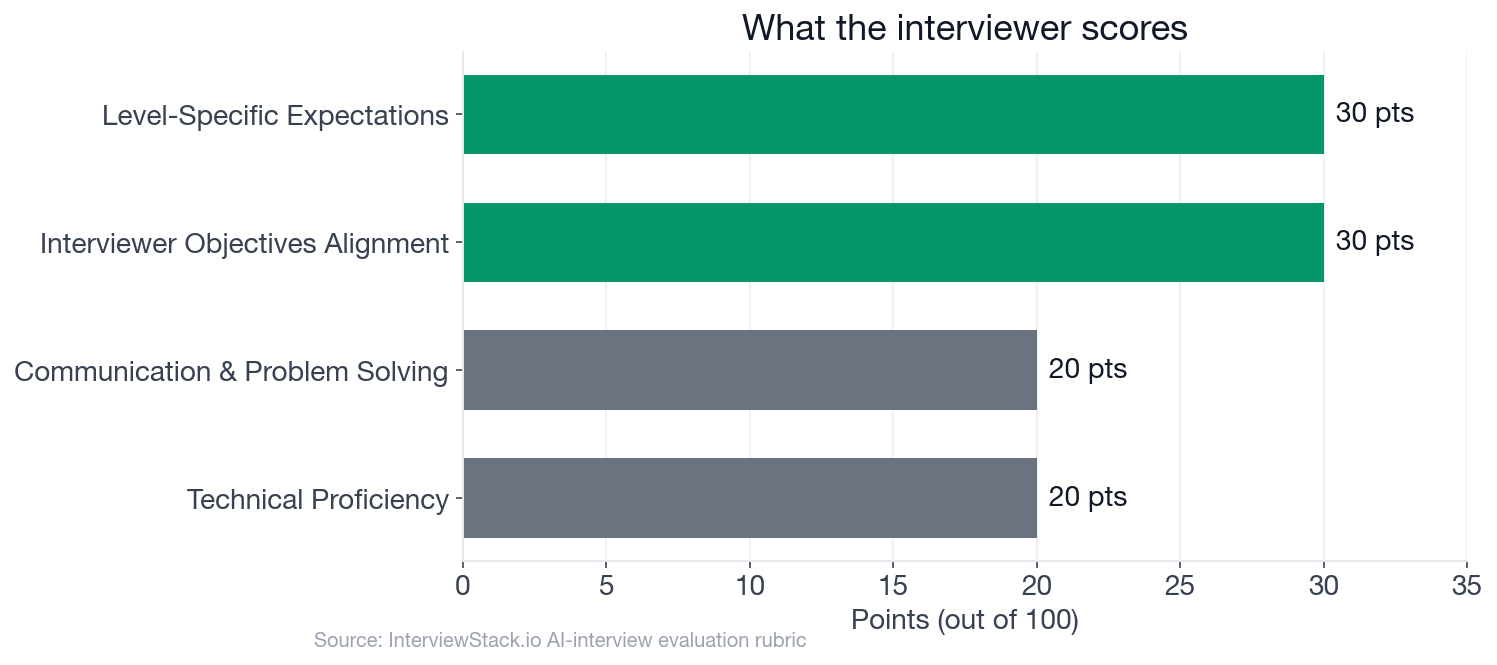
Interviewer Objectives Alignment and Level-Specific Expectations each hold 30 points; Technical Proficiency and Communication & Problem Solving hold 20 points apiece, so most of the score rewards judgment about state and trade-offs, not a specific tool.
What Is the Interviewer Really Scoring in This Scenario?
The interview question
You are building a cross-platform consumer app feature for a high-traffic marketplace app. A user can browse a paginated feed of listings, open a listing detail page, save an item, start filling out a multi-step inquiry form, switch apps, return later, lose network connectivity, or have the OS reclaim the app process while it's in the background. The product team wants the experience to feel fast on mid-range devices and be resilient so users do not lose meaningful progress.
How would you architect this feature end-to-end so that it handles lifecycle changes well, preserves the right state, and performs reliably on real mobile devices?
The interviewer isn't grading which architecture pattern you name. MVVM, a single state store, or a unidirectional-flow pattern all pass. What's actually being scored is whether you can design a production mobile architecture that survives lifecycle transitions and process death, make pragmatic cross-platform calls under device constraints, catch performance and memory risk before it ships, and talk about trade-offs and instrumentation like someone who has operated a mobile app in production, not just built one.
Nate's Answer, Turn by Turn
Meet Nate, a mid-level candidate working through this scenario live. He knows the vocabulary: state management, persistence, main thread, and he sketches a reasonable-looking architecture in the first two minutes. What costs him points is classification: which state belongs in which tier, and whether his answer survives the interviewer's follow-ups instead of restating the same idea in new words.
Turn 1: The State Tiering Decision
Interviewer: "How would you decide what state lives only in memory versus local persistence versus the server, and what would you restore after process death?"
Turn 2: Jank and Crashes in the Feed
Interviewer: "Suppose users report jank when scrolling the feed and occasional crashes after opening several listing details in one session. How would you investigate and mitigate that?"
Turn 3: The Stale Detail Screen
Interviewer: "How would your architecture change if the feed content updates frequently in the background and the user may return to a stale detail screen?"
Turn 4: Keeping It Maintainable Across iOS and Android
Interviewer: "How would you keep the design maintainable across iOS and Android while still respecting platform differences in lifecycle and resource constraints?"
Why Doesn't Recognizing the Mistake Fix It Live?
Every mistake above looks obvious with a red box around it. That's the trap of reading a walkthrough: you have time to notice a state tier Nate skipped, a metric he never named, a maintainability answer that dodges the platform difference. None of that distance exists live. You're classifying state, diagnosing a jank-and-crash report, and defending a cross-platform decision, all inside a 30-minute clock, with an interviewer reacting to your answer and asking the follow-up you didn't rehearse. Closing the gap between spotting a mistake on the page and not making it under pressure only comes from running the scenario yourself, enough times that the state-tiering instinct becomes automatic.
What Does a Complete 30-Minute Answer Look Like?
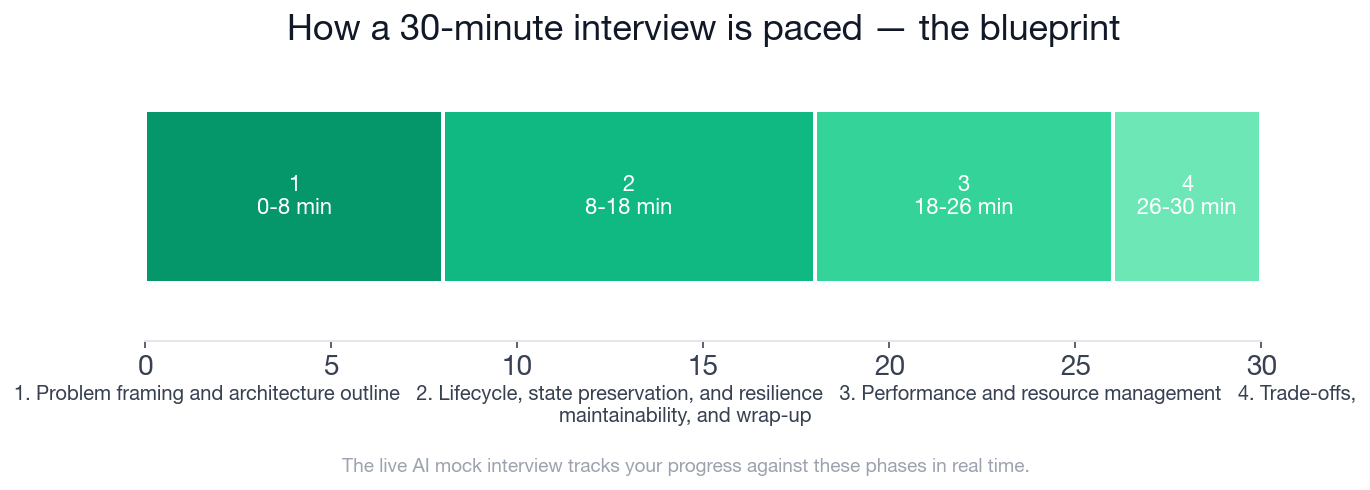
The timeline above shows the pacing: 8 minutes to frame the architecture, 10 on lifecycle and state preservation, 8 on performance and resource management, and a final 4 minutes on trade-offs and maintainability. Below is the full blueprint, phase by phase, with every checklist item a strong candidate hits. This is the exact structure InterviewStack.io's AI interviewer tracks you against in real time during the live mock interview.
- ✓Clarifies a few important assumptions such as offline expectations, draft persistence, and data freshness without turning the prompt into a checklist interrogation
- ✓Breaks the solution into sensible layers or modules
- ✓Explains screen-to-data flow for feed, detail, save action, and inquiry draft
- ✓Names clear ownership for state and side effects
- ✓Separates ephemeral UI state from durable draft/user progress
- ✓Explains what happens on app backgrounding, navigation away, process recreation, and relaunch
- ✓Defines restoration behavior for feed position, selected listing, saved state, and partially completed inquiry form
- ✓Addresses network loss and retry behavior in a user-visible, non-destructive way
- ✓Avoids restoring unsafe or stale state blindly
- ✓Calls out likely feed-performance issues such as pagination strategy, image loading, unnecessary recomputation, or excessive main-thread work
- ✓Recognizes memory risks from retained screens, large images, caches, or duplicate data copies
- ✓Suggests concrete mitigations rather than generic 'optimize it' language
- ✓Proposes a small set of meaningful production metrics or profiling methods
- ✓Articulates at least one trade-off around persistence granularity, data freshness, or complexity
- ✓Explains how shared concepts remain platform-agnostic while implementation details can differ by OS
- ✓Mentions targeted tests for restoration, draft recovery, and poor-network behavior
- ✓Summarizes the design crisply and adapts if the interviewer introduces a new constraint
Practice the State Split Before It's Live
Reading Nate's four turns is not the same as building your own state taxonomy against a live clock, with an interviewer asking about a scenario you didn't rehearse. Close that gap: start a live AI mock interview on mobile app architecture, lifecycle, and performance and get scored against this exact rubric, phase by phase, in real time. To build the underlying concepts first, the mobile app architecture and lifecycle question bank breaks the topic into focused drills, and the preparation guides cover what to expect in company-specific mobile interviews.
FAQ
Q. What does a Mobile Developer mobile app architecture and lifecycle interview actually test?
It tests whether you can build a layered mobile architecture that correctly classifies state (transient UI state, restorable screen state, durable user-generated data, and server-backed data) and explains recovery after backgrounding, recreation, and process death, plus catch concrete performance and memory risks and reason about cross-platform trade-offs. Interviewer Objectives Alignment and Level-Specific Expectations each carry 30 of the interview's 100 points, with Technical Proficiency and Communication & Problem Solving worth 20 points apiece.
Q. How much time do I have to frame the architecture before the interview moves into lifecycle questions?
Problem framing and the architecture outline run from minute 0 to minute 8, just 8 minutes, before the interview moves into lifecycle, state preservation, and resilience, the longest phase at 10 minutes with 5 separate checklist items, more than any other phase.
Q. What state should survive a process death, and what shouldn't?
Ephemeral UI state, like scroll position, can be lost. Restorable screen state, like the selected listing, and durable user-generated data, like an in-progress inquiry form, should be restored. Server-backed data like the feed itself is safe to refetch rather than persist. The checklist explicitly expects restoration behavior defined for feed position, selected listing, saved state, and the partially completed inquiry form.
Q. How should photos and draft text in a multi-step inquiry form be protected from loss?
Treat the in-progress inquiry form as durable, user-generated data, not transient UI state, and persist it locally at the field or step level as the user moves forward, rather than saving on every keystroke or only at final submission. That satisfies the checklist's separation between ephemeral UI state and durable draft progress without the storage and battery cost of writing to disk continuously.
Q. What production metrics show whether lifecycle handling and performance are actually improving?
A small, concrete set beats a large vague one: process-death restoration success rate, frame-drop or jank rate during feed scroll, memory high-water mark per session, and crash rate segmented by how many listing details were opened in the session. The checklist explicitly rewards proposing a small set of meaningful production metrics or profiling methods over generic monitoring language.
Q. Is this a real company's interview question?
No. The scenario is illustrative of how a strong mobile app architecture and lifecycle interview runs at the mid-level for a Mobile Developer, not a leaked question from a specific employer.
Q. Where can I practice this exact scenario?
Start a live AI mock interview built on this blueprint. It runs the same 30-minute, four-phase structure and scores you against the same rubric in real time, or drill individual questions first in the mobile app architecture and lifecycle question bank.
Classification Beats the Pattern Name
The candidates who leave this interview with an architecture a real team could maintain aren't the ones who name the trendiest state management library fastest. They're the ones who sort every piece of state into its tier before writing a line of code, then prove that sort holds up under a jank report, a stale screen, and a platform difference. Run the live mock interview and find out whether your classification survives the same pressure.
Topics
Ready to practice?
Put what you've learned into practice with AI mock interviews and structured preparation guides.