
The App Team Says It's Healthy. Now What?
You are the on-call network engineer for a 600-person office. One floor cannot reach the internal HR app, every other floor can, and the application team has just told you their monitoring hosts see it fine. The tempting move is to pick a side immediately ("it's DNS," "it's the app"), and that instinct is exactly what this blueprint is built to catch. This walkthrough follows a simulated mid-level Network Engineer mock interview on network troubleshooting and diagnostics, with illustrative answers from a candidate we'll call Marcus.
Key Findings
- The mock interview is scored out of 100 points; 60 of them (30 + 30) reward objectives alignment and level-specific judgment, and only 20 reward technical proficiency.
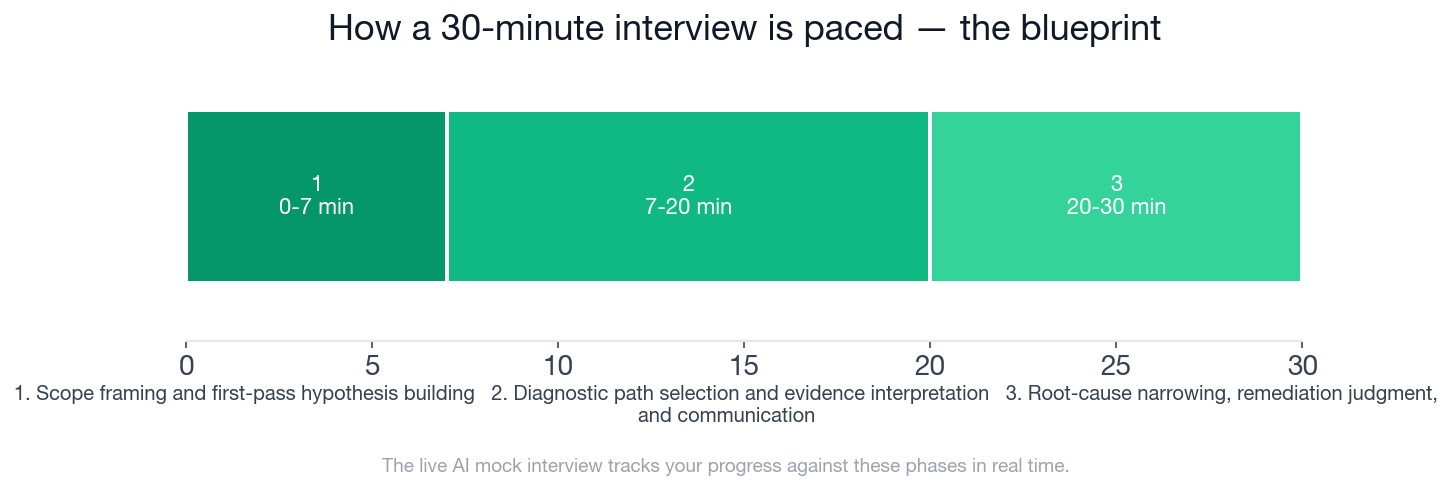
- The 30 minutes split into three phases of 7, 13, and 10 minutes.
- Phase 2 (7-20 minutes) carries 6 expected checklist items, the most of any phase, out of 15 across the interview.
- The scenario: roughly 600 users, 1 affected floor, and an app team reporting a healthy service.
- The mid-level bar expects 2-3 plausible hypotheses, eliminated one by one with evidence.
- 4 topic areas are explicitly out of bounds, including architecture design and coding exercises.
- This post dramatizes 4 of the interview's 6 follow-up probes.
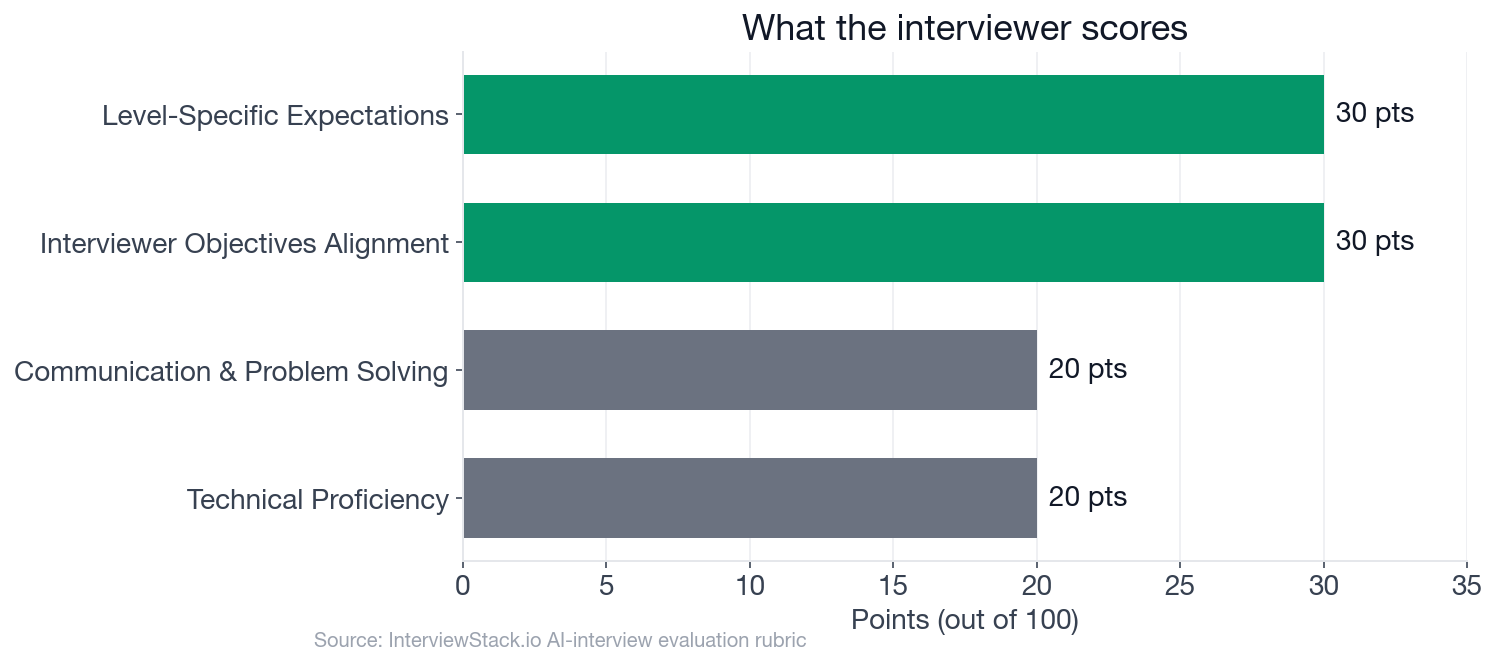
The weights tell you the game: a correct command with no reasoning around it leaves most of the points on the table.
What Does a Network Engineer Troubleshooting Interview Actually Test?
The question below is the opening ask. Everything after it is the interviewer pulling on whichever thread you leave loose.
The interview question
You are the primary network engineer on call for a corporate office with about 600 users. Since this morning, employees on one floor report they cannot reach an internal HR web application at hr.corp.example.com, while users on other floors can access it normally. The affected users say general internet access seems fine, and the application team says the HR application is healthy and reachable from their monitoring hosts in the data center.
You have access to standard enterprise network tooling and can run diagnostics from a user endpoint, the floor's access switch, and core network devices.
Walk me through how you would troubleshoot this incident from first symptom to likely root cause, including what you would check first, how you would narrow the fault domain, and how you would decide on the next action at each step.
The interviewer is not hunting for a clever trick. The objectives are a structured layered method, hypotheses tested against evidence, tool output interpreted correctly, and calm judgment about blast radius and escalation. A common first answer is a tidy list of commands. A strong one is an ordered plan where each result decides the next step.
Four Follow-Ups, Four Places Points Leak
Turn 1: DNS Fails, Gateway Pings
Interviewer: "If the affected users can ping the default gateway but cannot resolve hr.corp.example.com, how would that change your investigation?"
Turn 2: Traceroute Dies at Hop One
Interviewer: "Suppose DNS resolves correctly, but a traceroute from an affected client stops after the first L3 hop while the same traceroute from another floor completes. What would you check next and why?"
Turn 3: SYN Out, No SYN-ACK
Interviewer: "If packet capture on a client shows SYN packets leaving but no SYN-ACK returning, what are the most likely fault domains and how would you separate them?"
Turn 4: Prove the ACL Before Rollback
Interviewer: "If the issue turns out to be caused by an ACL or firewall policy, what evidence would you want before escalating or requesting a rollback?"
Would You Run This Playbook Cold, Under a Clock?
You just watched four mistakes get caught in seconds. That part is easy, because the answer is on the page. Live, you have 30 minutes, an interviewer who changes the evidence mid-answer, and a habit of grabbing the first plausible theory. Knowing ping, traceroute, and tcpdump is the easy part. What is hard under pressure is the ordering, the stated expectations for each result, and the discipline to say "here is what this would prove or eliminate." That only comes from reps with someone pushing back.
Which Checklist Items Decide the Score?
This is the blueprint a strong candidate hits, and it is what the AI mock interview tracks you against in real time. Note where the minutes go: 7 on framing, 13 on diagnostics, 10 on convergence and communication.
- ✓Asks or states need to confirm who is affected, whether issue is floor-wide/VLAN-specific, and whether problem is reproducible
- ✓Differentiates application health from network reachability and does not assume app team is wrong or right without verification
- ✓Starts with endpoint basics such as IP, subnet, gateway, DNS, and comparison with a working client
- ✓Outlines an ordered plan instead of listing tools without decision points
- ✓Explains how to use a working-vs-broken comparison from another floor or VLAN
- ✓Checks whether clients have correct addressing and can reach the local gateway before moving upstream
- ✓Mentions validating switchport/VLAN membership, uplink health, and MAC/ARP learning for the affected segment
- ✓Uses traceroute or equivalent to identify where the path diverges or stops
- ✓Separates name resolution failures from transport failures and suggests `nslookup`/`dig` or equivalent appropriately
- ✓If introducing packet capture, states what packets they expect to see and how that narrows the issue
- ✓Names likely root causes that match the evidence rather than producing an unfocused list
- ✓Correlates with recent changes when scenario suggests VLAN, ACL, routing, or firewall updates
- ✓Proposes a low-risk validation or remediation step such as checking ACL hit counts, verifying SVI config, or moving one test port/client
- ✓States what evidence would justify escalation to systems, firewall, or application owners
- ✓Summarizes probable root cause, remaining unknowns, and immediate next steps in a concise operational manner
Troubleshoot This Floor Outage Out Loud
Start the AI mock interview for this exact scenario and get scored against the same rubric and checklist: start the Network Engineer mock interview. Want to warm up first? Drill related prompts in the network troubleshooting question bank, or browse company-specific preparation guides and current Network Engineer openings to see what employers ask for. You can also explore more AI mock interviews.
FAQ
Q. What does a Network Engineer troubleshooting interview test?
It tests whether you can narrow a fault methodically. In this 30-minute mock interview, 60 of 100 rubric points go to objectives alignment and level-specific judgment, and 20 go to technical proficiency. A layered plan with decision points beats a list of commands.
Q. How long is the network troubleshooting mock interview?
30 minutes in three phases: scope framing (0-7 minutes), diagnostic path selection and evidence interpretation (7-20), and root-cause narrowing with remediation judgment (20-30).
Q. What should you check first when one floor cannot reach an internal app?
Confirm the blast radius and reproduce the problem, then check endpoint basics (IP, subnet, gateway, DNS) and compare against a working client on another floor. Do not assume the app team or the network is at fault until you have verified it.
Q. How do you tell a DNS failure from a connectivity failure?
Query the resolver directly with nslookup or dig, then test the destination by IP. If the IP works and the name does not, the fault is name resolution. If neither works, move up to path and policy checks.
Q. What evidence justifies escalating to the firewall or systems team?
A reproducible test (same source, destination, and port), a comparison with a working path, device evidence such as ACL hit counters on a deny rule, and a timeline that lines up with a recent change. Escalate with that package, not a hunch.
Q. What does the mid-level bar expect when you troubleshoot?
2-3 plausible hypotheses tested one by one with evidence. Jumping to a single cause before eliminating alternatives misses that expectation, which is scored under Level-Specific Expectations (30 points).
Evidence Before Action
The strongest troubleshooters in this scenario never name a culprit early. They compare, eliminate, and escalate with proof. Rehearse that sequence out loud until it is automatic, and the 100 points follow.
Topics
Ready to practice?
Put what you've learned into practice with AI mock interviews and structured preparation guides.