
There's No Framework Standing Between You and the DOM
A mid-level Frontend Developer sits down for a 30-minute interview built entirely around plain JavaScript and the browser platform. No React. No Vue. No component library standing between the code and the DOM. This walkthrough is built from a real InterviewStack.io AI mock interview blueprint for exactly that scenario, and the four things it explicitly rules out, framework patterns, backend or database design, CSS layout systems, and algorithmic puzzles, tell you as much about what it is testing as anything it actually asks for.
Years spent shipping React components will teach you to describe a render cycle without thinking twice. It won't automatically teach you why a click handler wired up at page load stops firing on a post that gets added five minutes later, once the framework's own delegation and re-rendering machinery is gone. That gap, not any obscure browser trivia, is what this interview is built to surface.
Key Findings
- The rubric is worth 100 points across 4 dimensions: 30 for Interviewer Objectives Alignment, 30 for Level-Specific Expectations, 20 for Technical Proficiency, 20 for Communication and Problem Solving.
- The interview runs 30 minutes across 3 phases: 0-7 minutes on framing, 7-20 minutes on core DOM and event implementation, 20-30 minutes on trade-offs and robustness.
- The blueprint scores against 14 expected checklist items in total: 4 in framing, 5 in implementation, 5 in trade-offs.
- 4 entire skill areas are explicitly out of scope: React, Vue, or Angular patterns, backend or database design, CSS layout systems, and algorithmic puzzles unrelated to browser behavior.
- The interviewer has 6 scripted follow-up prompts ready across the 30 minutes; this walkthrough dramatizes 4 of them.
- The interview's 4 level-specific expectations set the bar at a workable plain-JavaScript approach with awareness of delegation, state sync, and basic accessibility, not knowledge of obscure browser internals.
What Does the Frontend Developer DOM Manipulation and Browser APIs Interview Actually Watch For?
The interviewer hands you a small starting shell and a sample API response, then frames the scenario around it.
The interview question
You are building a browser-only prototype for an internal content moderation tool. A reviewer should be able to load posts into the list below, toggle like state for any post, and remove a post from the DOM after it is moderated. New posts may be appended later using the same UI.
<div id="feed"> <button id="load-more">Load more</button> <ul id="results"></ul> </div>const apiResponse = [ { id: "p1", author: "Ari", text: "First post", liked: false }, { id: "p2", author: "Sam", text: "Hello world", liked: true } ];
How would you implement this interaction using plain JavaScript and browser APIs?
What is actually being measured here is whether you can reason about browser-native interactive behavior without a framework: how you structure state and DOM updates, whether you reach for event delegation over one-off listeners, whether you avoid obvious performance pitfalls like unnecessary reflows or leaked listeners, and whether you can talk through accessibility and maintainability trade-offs the way a mid-level engineer would in a real design discussion. If any of that terminology feels rusty, the question bank entries for DOM Manipulation and Browser APIs are a fast way to refresh before you practice live.
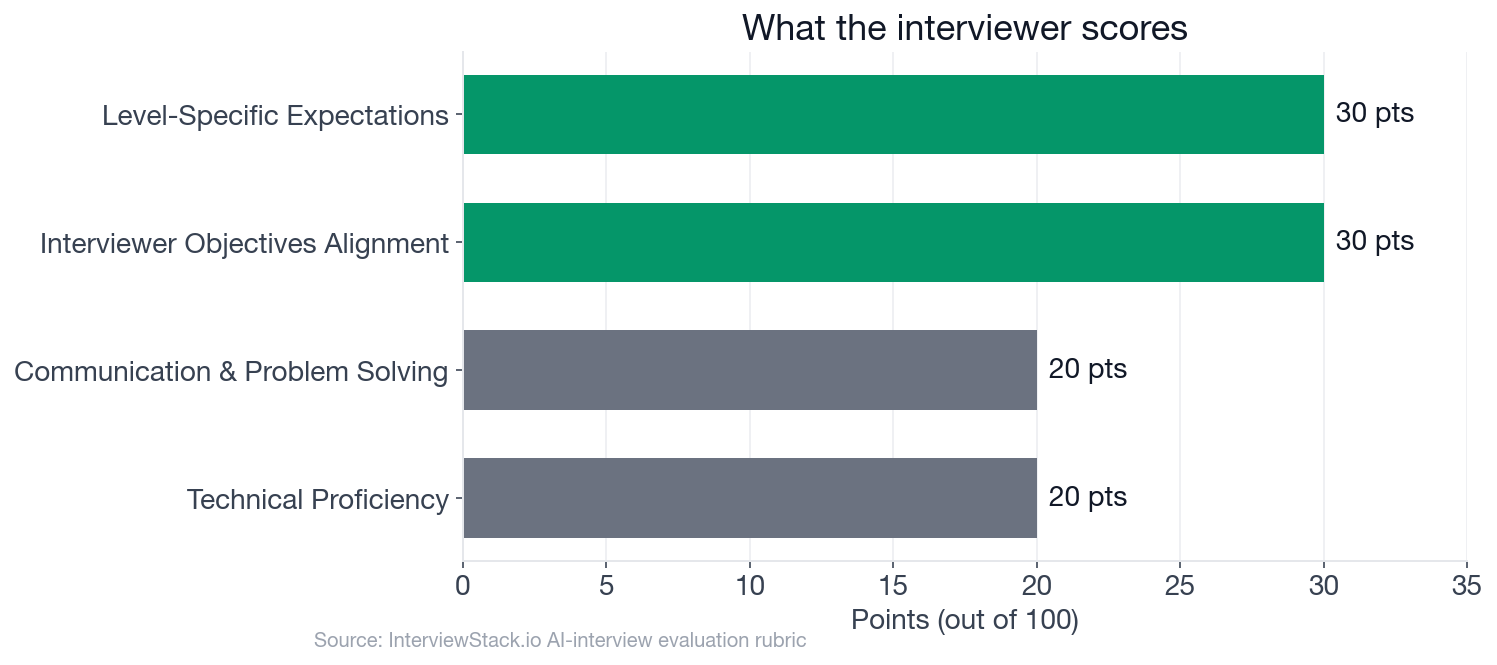 The rubric weights Interviewer Objectives Alignment and Level-Specific Expectations at 30 points each, 60 of the 100 points combined, one and a half times the 40 points combined for Technical Proficiency and Communication and Problem Solving, so how you frame and reason through the problem carries more of the score than code output and communication mechanics alone.
The Walkthrough: Four Follow-Ups, One Recurring Habit
The interviewer's script has 6 follow-up prompts ready. These four cover the ground where mid-level candidates most often lose points: structuring events for scale, keeping state and the DOM honest, batching DOM work, and building a control a keyboard can actually reach. Each dramatized answer below is a common pattern, not a transcript of a real candidate.
Turn 1: One Listener, Every Post
Interviewer: "If the list grows to hundreds of posts and new items are added after the initial render, how would you structure your event handling and why?"
Turn 2: Keeping State and DOM Honest
Interviewer: "How would you keep the DOM and your in-memory state from drifting out of sync after multiple like toggles and removals?"
Turn 3: Batching the Big Load
Interviewer: "What browser APIs or techniques would you use to minimize unnecessary DOM work when loading or appending many posts at once?"
Turn 4: Reachable Only by Mouse
Interviewer: "How would you make sure this interaction remains usable from the keyboard and understandable to assistive technologies?"
What Happens When the Interviewer Adds a Hundred More Posts?
Every mistake above reads as obvious once it is laid out in a red box with the fix sitting right underneath it. Under real interview conditions, the interviewer does not lay it out this way: they change one assumption, say a hundred posts load at once, or the reviewer tabs through with a keyboard, and watch whether your working demo holds up or quietly breaks. Spotting Freya's mistakes on this page took a few seconds; catching them in your own code while you are still talking through the framing phase, with the clock running, is a different skill entirely. The only way to build that skill is repetition against an interviewer that actually pushes back mid-answer, which is what the InterviewStack.io AI mock interview does, and what a static page cannot.
Three Phases, Thirty Minutes, One Rubric
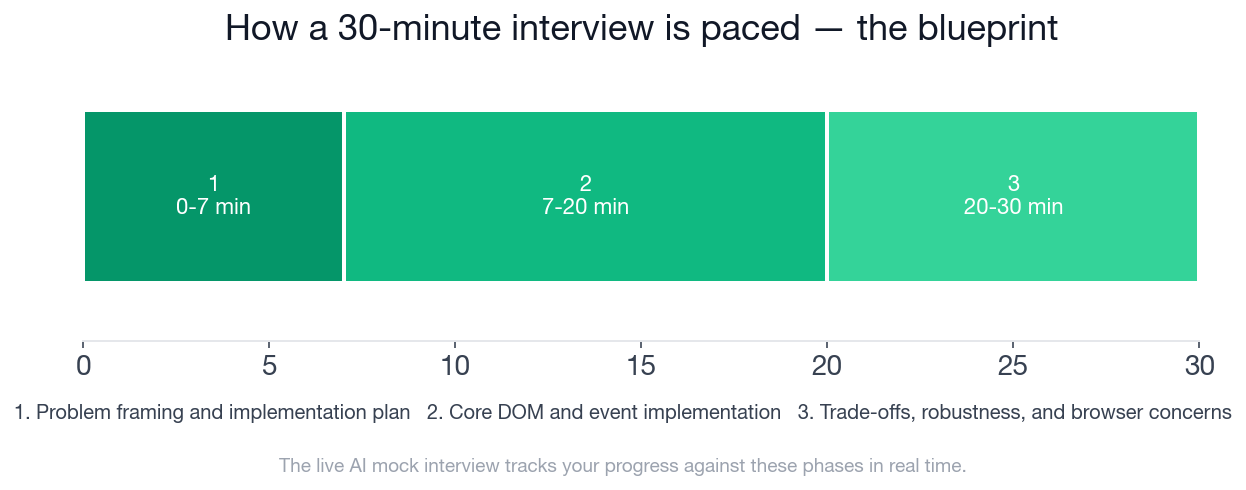 The 30 minutes split into a 7-minute framing phase, a 13-minute implementation phase, and a 10-minute trade-offs phase, and each phase carries its own checklist.
This is the complete blueprint a strong candidate hits, phase by phase, and it is the exact structure the AI interviewer tracks you against while you are live, not just at the end.
- ✓Clarifies or states assumptions about initial render, repeated load behavior, and what 'remove after moderated' means in the prototype
- ✓Proposes a state structure such as an array or map keyed by post id
- ✓Identifies the main operations: render/load, like toggle, remove/moderate
- ✓Chooses a sensible event strategy, ideally delegation on the list container or a nearby parent for dynamic items
- ✓Builds post list items with stable identifiers, for example via data-post-id
- ✓Implements loading/appending posts into the ul in a way that would work for the provided markup
- ✓Implements like toggling by updating both state and visible UI for the correct post
- ✓Implements removal/moderation by locating the correct item and removing it from DOM and state
- ✓Uses target matching logic robustly enough for nested click targets, such as closest()
- ✓Explains why event delegation is preferable to per-item listeners for appended content
- ✓Mentions batching insertion for many nodes, such as using DocumentFragment or minimizing repeated mutations
- ✓Addresses keyboard-accessible controls by using real buttons and updating accessible labels or pressed state
- ✓Discusses at least 2 realistic edge cases, such as duplicate loads, missing ids, double-click races, or stale references after removal
- ✓Shows a reasonable plan for adapting to async server persistence, such as optimistic UI with rollback or disabled controls during pending state
Every checkmark above maps to a specific, gradeable behavior, not a vibe. That is also why reading the checklist is a poor substitute for running it under time pressure.
Can You Wire This Up Without a Pause Button?
Reading the fixes above is the easy part. The real test is building this interaction live, defending your event-handling choice out loud, and adjusting when the interviewer changes the scenario mid-answer, all without a pause button. Start a free AI mock interview on DOM Manipulation and Browser APIs and get scored against this exact blueprint in real time. Want to warm up first? Drill the underlying concepts in the question bank, browse company-specific prep guides if you are targeting a specific process, or check what Frontend Developer roles are hiring right now once you are ready to put the practice to use.
FAQ
Q. What does a mid-level Frontend Developer DOM Manipulation and Browser APIs interview actually score?
The rubric is worth 100 points across four dimensions: 30 points for Interviewer Objectives Alignment (whether you satisfied the specific scenario), 30 for Level-Specific Expectations (whether you showed a mid-level, 2 to 5 year bar of judgment), 20 for Technical Proficiency, and 20 for Communication and Problem Solving.
Q. Why is event delegation preferred over a listener on every list item?
Because the scenario explicitly allows new posts to be appended after the initial render, a listener attached only to the posts present at load time never covers items added later. A single listener on the list container, combined with closest() to resolve the actual clicked row, covers every post, present now or appended afterward, which is exactly what the blueprint's framing-phase checklist rewards.
Q. How should you keep DOM updates fast when loading many posts at once?
Build the new list items into a DocumentFragment first and append that fragment to the list once, instead of calling appendChild inside the loop, so the browser recalculates layout a single time instead of once per post. The blueprint's trade-offs phase checklist explicitly rewards batching insertion this way.
Q. What accessibility details does this interview expect for a like or remove interaction?
Real button elements for the like and remove controls, so they are focusable and triggerable from the keyboard by default, plus an accessible state signal like aria-pressed for the liked toggle so a screen reader announces the current state, not just a color change. This maps directly to the trade-offs phase's keyboard-accessible controls checklist item.
Q. How should the design change if removing a moderated post might later fail on the backend?
A reasonable answer is optimistic removal: taking the post out of the DOM and state immediately for a responsive prototype, while keeping enough information to restore it and surface an error if a future backend call fails. The blueprint's level-specific expectations reward exactly this kind of pragmatic trade-off over either ignoring the async case or over-engineering a queue system nobody asked for.
Q. What edge cases should you test before shipping this prototype?
At minimum: duplicate load calls that could render the same post twice, a missing or malformed post id, a double click that fires the like toggle twice before the UI updates, and a click on a post that was already removed. The blueprint's trade-offs phase checklist calls out at least 2 realistic edge cases like these as part of a passing answer.
Q. How long does the mock interview run and how many follow-up questions does it include?
The scenario runs 30 minutes across three phases: 7 minutes on framing, 13 minutes on core DOM and event implementation, and 10 minutes on trade-offs and robustness, with the interviewer working from 6 scripted follow-up prompts across those phases.
The Platform Was Already Enough
Freya's mistakes above are not exotic. They are the default output of years spent writing components inside a framework that handled delegation and batching automatically, and made it easy to reach for accessible primitives, without anyone having to name what it was doing. This interview strips that layer away and asks you to prove you still know what was underneath it. The fastest way to find out where you actually stand is to run the live version yourself. For the state and data-flow side of the same role, see our walkthrough on frontend component and state architecture.
Topics
Ready to practice?
Put what you've learned into practice with AI mock interviews and structured preparation guides.