
You open the file and find duplicated copies of the same button, a page called "Final FINAL v3," and a loading spinner that outlasts your coffee. Then the interviewer says the team ships next sprint and everyone is asking whether AI can fix this. A prepared mid-level UI Designer answers with a tidy list of Figma features and quietly drops points on prioritization, judgment, and boundaries.
A Messy Figma File Is Really a Prioritization Test
This walkthrough follows one simulated 30-minute mock interview for a mid-level UI Designer on design tools and AI-assisted workflows. It is built from a real interview blueprint, and the candidate answers below are dramatized for illustration, not a transcript of any person or company. You can browse current UI Designer openings to see how often tool fluency shows up in real postings.
Key Findings
- The interview is scored out of 100 points across 4 dimensions, and 60 of those points reward objectives alignment and level-specific judgment, not tool trivia.
- Technical Proficiency, the dimension a purely tool-focused prep plan targets, is only 20 of 100 points.
- The 30-minute interview runs in 3 phases: 0 to 8 minutes of diagnosis, 8 to 20 of collaboration and components, 20 to 30 of performance and AI judgment.
- The blueprint tracks 14 expected checklist items: 4 in phase one, 5 in phase two, and 5 in phase three.
- The longest phase, 12 minutes, covers branching, merging, and component resilience.
- 1 of the 5 phase-three checklist items is explicitly about setting boundaries on AI and plugin use.
- 4 topics are deliberately out of scope (design tokens, governance, accessibility auditing, developer handoff), so spending time on them costs you minutes without earning points.
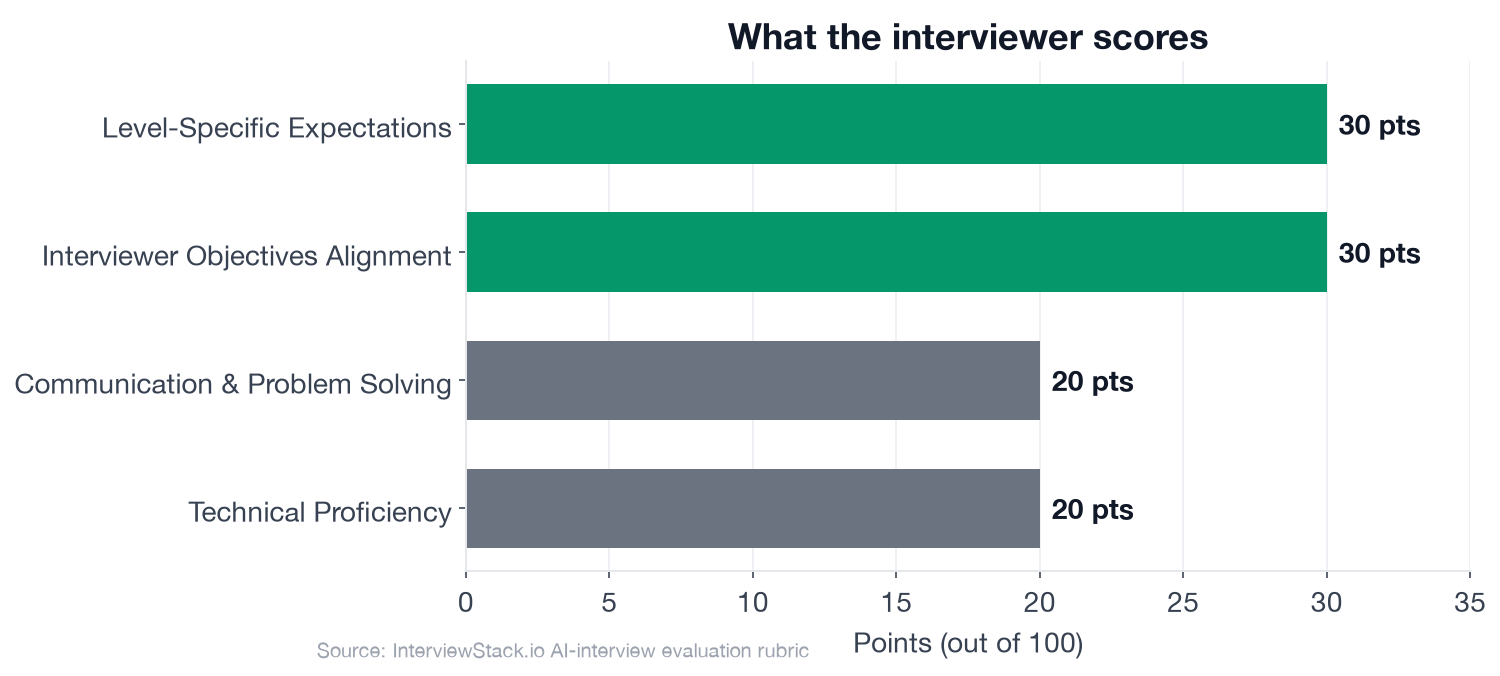
The chart makes the point: 60 percent of the score rewards how you reason about the team's situation, so a feature tour is the wrong strategy.
What Does a UI Designer Figma Workflow Interview Actually Score?
The scenario is a cross-platform feature launch where several designers have worked in parallel for weeks. Detached components, poor layer names, a slow file, and no shared rule for branching have piled up, and the team also wants AI and plugins without creating more cleanup.
The interview question
You have joined a product team at a large consumer tech company working on a cross-platform feature launch. The design team shares one Figma workspace for the feature across mobile web, iOS, and Android. After a few weeks of parallel work, the main file is hard to use: pages are inconsistent, layers are poorly named, components have been detached and duplicated, opening the file is slow, and people are unsure when to branch versus edit the main file directly. The team also wants to move faster with AI and plugins, but there are concerns about quality, privacy, and creating more cleanup work later.
Assume you are the UI designer responsible for stabilizing the workflow for the next sprint while keeping the team shipping. How would you approach cleaning up and restructuring this design workflow so the team can collaborate efficiently in the tool and move faster without making the file or component library harder to maintain?
The interviewer is probing whether you can run a messy file like a small project: triage, a collaboration rule others can follow, components that survive real content, and judgment about automation. The follow-ups below test exactly those four things.
The Turn-by-Turn Walkthrough
Our dramatized candidate, Priya, is capable and well prepared. The mistakes are the ones prepared people actually make.
Turn 1: Day one, what changes
Interviewer: "If you opened the file and had only the first day to improve things, what would you change immediately versus defer?"
Turn 2: Components that break
Interviewer: "Suppose a frequently used component works fine with placeholder text but breaks with long real content and different screen sizes. How would you rebuild or adjust it?"
Turn 3: Why is it slow
Interviewer: "The file is noticeably slow to open and edit. What would you inspect first, and what concrete actions would you take to improve performance without blocking the team?"
Turn 4: AI and plugin boundaries
Interviewer: "Where would you use AI or plugins in this workflow, and where would you deliberately avoid them?"
Can You Spot These Traps Under a Running Timer?
Every mistake above looks obvious on the page. Live, with a timer running and an interviewer who changes direction, even strong candidates ramble through the first eight minutes or forget to say the guardrail out loud. Spotting these patterns is easy; avoiding them under pressure and unscripted follow-ups is the real skill, and it only comes from reps.
The Design Tools Blueprint a Strong Candidate Hits
This is the blueprint the AI mock interview tracks you against in real time. Phase timing is part of the test, so practice finishing each phase's checklist inside its window.
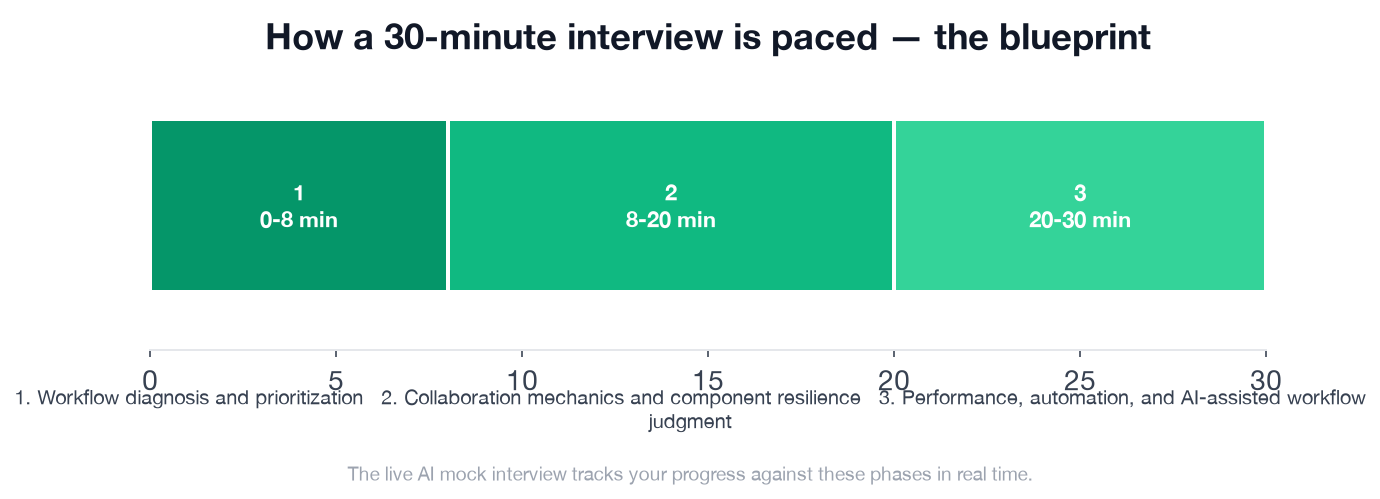
The three phases run 8, 12 and 10 minutes, so the longest middle phase is where most of your time and points sit.
- ✓States a clear first-pass plan rather than jumping randomly between issues
- ✓Separates urgent fixes needed for active sprint work from lower-priority cleanup
- ✓Proposes concrete structure for pages/sections/layers that would make the file searchable and navigable
- ✓Mentions protecting in-progress work while cleanup happens
- ✓Defines a sensible rule of thumb for branch usage versus direct edits
- ✓Describes how they would reduce duplicate or detached components and restore source-of-truth usage
- ✓Explains at least one concrete component setup using layout/resizing/variants in a way that handles long text or changing states
- ✓Mentions reviewing merge conflicts or visual regressions before publishing shared changes
- ✓Shows awareness that over-complex variants or nested structures can become hard to maintain
- ✓Names plausible sources of slowness such as oversized images, excessive pages, heavy libraries, complex effects, or component misuse
- ✓Suggests concrete mitigation steps rather than generic 'clean it up' advice
- ✓Identifies useful AI or plugin applications such as bulk renaming, content generation drafts, asset cleanup, or repetitive layout tasks
- ✓Sets boundaries for AI/plugin use based on privacy, accuracy, consistency, or maintenance risk
- ✓If asked about migration, evaluates team fit factors such as collaboration model, library support, platform needs, and transition cost
Run This Interview Live
Reading the blueprint tells you what a strong answer contains; only a live session shows whether you deliver it on time and under follow-up pressure.
Start the AI mock interview for this exact scenario and get feedback against the same rubric. Then use the question bank for design tools and AI-assisted workflows to drill adjacent questions, and browse role-specific preparation guides to see how interviews for this role are structured. For a different angle on the same role, see our UI Designer design systems walkthrough.
FAQ
Q. What does a mid-level UI Designer Figma workflow interview test?
It tests judgment more than tool trivia. In a 30-minute AI mock interview scored out of 100, 60 points go to interviewer objectives and level-specific expectations, 20 to technical proficiency, and 20 to communication. The scenario is a shared file that has grown messy, so prioritization, branching rules, resilient components, performance, and AI boundaries all count.
Q. How should I answer a question about cleaning up a messy Figma file?
State a first-pass plan before touching anything: separate what blocks this sprint from what can wait, propose a concrete page, section, and layer structure, and protect in-progress work while the cleanup happens. Jumping between issues at random is the pattern the first phase (minutes 0 to 8) is built to catch.
Q. When should designers branch instead of editing the main file?
A sensible rule of thumb is to branch for changes that touch shared components or could disrupt other designers, and edit directly only for small, isolated work. Whatever rule you choose, add a review of merge conflicts and visual regressions before publishing shared changes.
Q. How do you make a component survive long real content?
Build it with auto layout and sensible resizing constraints, then test it with long strings, short strings, and different screen widths instead of tidy placeholders. Keep variants simple, because over-complex variants and deep nesting become a maintenance problem of their own.
Q. Where should a UI designer use AI and plugins, and where not?
Good fits include bulk renaming, drafting placeholder content, asset cleanup, and repetitive layout tasks. Set boundaries around privacy, accuracy, consistency, and long-term maintenance, and say plainly which decisions you would never delegate.
Q. How long is the practice interview, and does it cover Figma specifically?
The AI mock interview runs 30 minutes in three phases (0 to 8, 8 to 20, and 20 to 30 minutes). It covers working in a collaborative design tool such as Figma, Sketch, or Adobe XD; design tokens, accessibility auditing, and developer handoff are deliberately out of scope.
Where to Start Tonight
Pick one messy file you actually work in, give yourself eight minutes, and say your triage plan out loud before touching anything. Then run the live mock interview and see which of the 14 checklist items you hit.
Topics
Ready to practice?
Put what you've learned into practice with AI mock interviews and structured preparation guides.